

Concepts
OVERVIEW
Section titled “OVERVIEW”What is SmartForge?
Section titled “What is SmartForge?”SmartForge is an enterprise intelligence layer that sits on top of your existing systems. You ask a question in natural language. SmartForge understands what you’re looking for, fetches live data from all your enterprise systems in parallel, merges the results intelligently, and returns a single trusted answer — all in seconds.
Think of it as a universal interpreter for your enterprise. Instead of logging into four different systems to answer one business question, you ask once — and get a complete, accurate answer built from every relevant source simultaneously.
Why SmartForge Exists
Section titled “Why SmartForge Exists”The fragmentation problem
Section titled “The fragmentation problem”|
Multiple systems, zero integration ERP handles orders and financials. WMS owns inventory and logistics. TMS manages transportation and tracking. CRM tracks customers. Each system has part of the answer — but no system has all of it. |
Repeated manual queries A single business question — "where is this order?" — requires querying 3 or more systems, then manually reconciling the results. Teams do this dozens of times a day, every day. |
|
Business logic trapped in dashboards Custom dashboards and reports exist because the systems can't talk to each other. But dashboards go stale, break silently, and require constant maintenance as systems change. |
Decision delays from data lag By the time teams pull reports, reconcile data across systems, and distribute answers, the underlying situation may already have changed. Slow answers mean slower decisions. |
The SmartForge Solution
Section titled “The SmartForge Solution”One Question. Every system. Real time
Section titled “One Question. Every system. Real time”SmartForge solves fragmentation at the source. Instead of forcing humans to manually query and reconcile data across systems, SmartForge sends questions directly to each system simultaneously — and combines the results into a single, trustworthy answer.
- No data is ever copied between systems. SmartForge queries your systems directly — your data stays where it lives.
- All queries run in parallel. A question that previously took a person 10 minutes across 3 systems is answered in seconds.
- Business logic is encoded once in SmartForge, not scattered across dozens of custom dashboards.
- Every answer is role-aware. Users see only the data they’re permitted to see — no more, no less.
- Every query is audited. There is a complete log of what was asked, what systems were queried, and what was returned.
Real-world example: Order status visibility
Section titled “Real-world example: Order status visibility”This is the most common cross-system query in any fulfilment operation. Here’s how the same question is answered before and after SmartForge.
| # | Without SmartForge | With SmartForge |
|---|---|---|
| 1 | Log into ERP → search order 12345 → check order status | User types: “Where is order 12345?” |
| 2 | Log into WMS → find the order → check fulfilment status | SmartForge queries ERP, WMS, and TMS simultaneously |
| 3 | Log into TMS → locate shipment → find tracking number | Results are merged and validated automatically |
| 4 | Manually reconcile all three results into one answer | Response: “Packed and ready for pickup at Warehouse 5. Scheduled delivery: 2:00 PM tomorrow.” |
| Outcome: Avg. 8–12 minutes per query 3 systems involved Manual reconciliation required |
Outcome: Under 3 seconds All 3 systems connected Zero manual steps |
The Three Pillars
Section titled “The Three Pillars”SmartForge is built on three tightly integrated components. Each one has a distinct role. Together, they form a complete system — from how you ask questions, to how capabilities are defined, to how queries are safely executed.
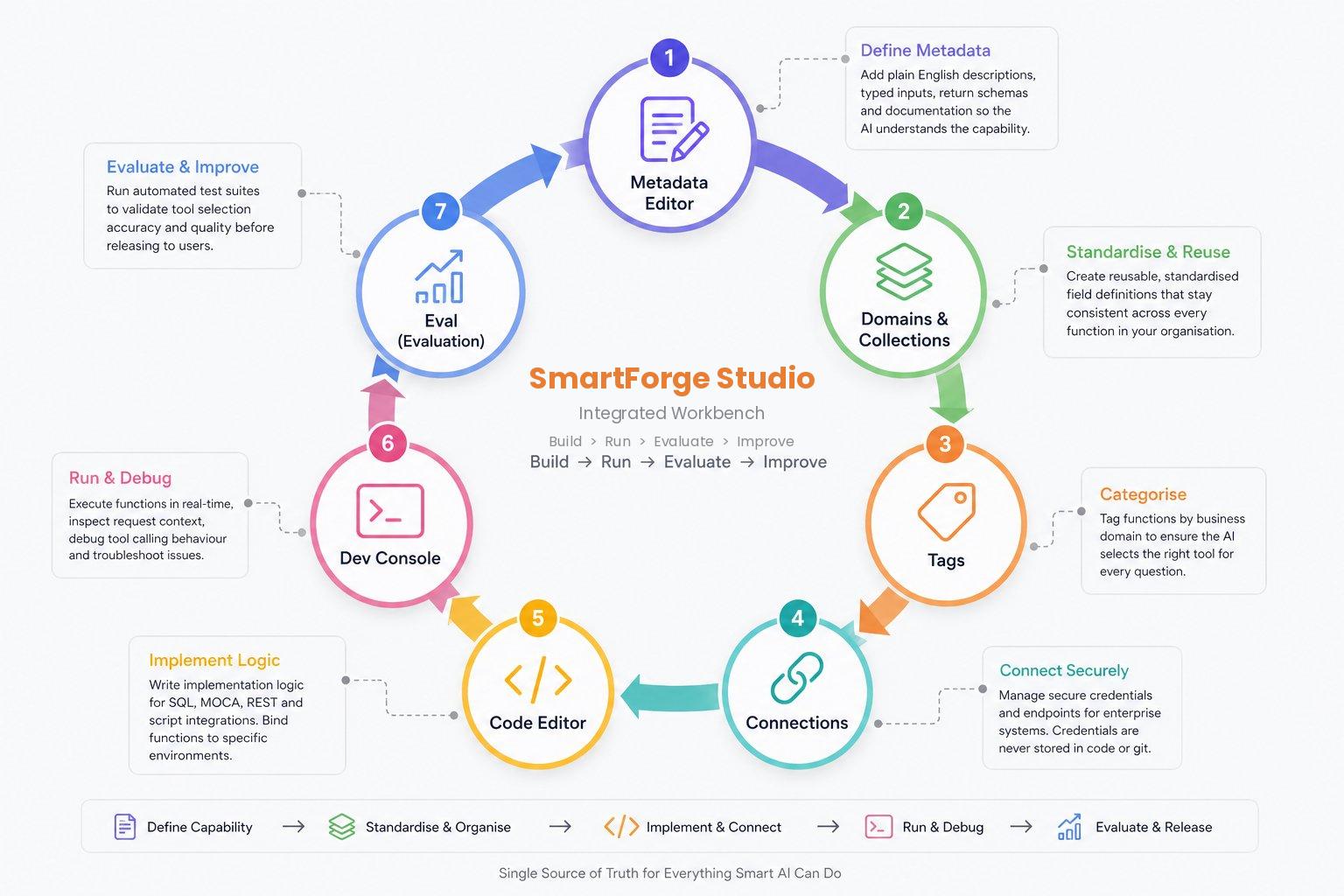
Pillar 1: SmartForge Studio
Section titled “Pillar 1: SmartForge Studio”Define capabilities
Section titled “Define capabilities”SmartForge Studio is the workbench where builders and integrators define what SmartForge can do. Every capability in SmartForge Cortex exists because someone built a function (also called an Intent) in SmartForge Studio. This is where business logic lives — clearly defined, versioned, and reusable.
Pillar 2: SmartForge Nexes
Section titled “Pillar 2: SmartForge Nexes”Secure execution
Section titled “Secure execution”SmartForge Nexes is the execution engine that actually talks to your systems. When SmartForge Cortex identifies which function to run, SmartForge Nexes validates the request, dispatches queries to each connected system in parallel, and applies the reducer logic to merge results into a single coherent response.
What happens during a query:
- The request is validated against the user’s role (RBAC) and the function’s allowed inputs
- Queries are dispatched simultaneously to all relevant systems — ERP via SQL, WMS via MOCA, TMS via REST API
- Results are merged using precedence rules defined in the function’s reducer
- A single unified result is returned to SmartForge Cortex — and the user
- All activity is logged with masked sensitive data for audit compliance
Core capabilities of SmartForge Nexes:
- Federation
Run the same logical query across multiple systems simultaneously
ERP + WMS + TMS in one call - Aggregation
Combine live data from multiple sources into a single result set
Available-to-promise inventory - RBAC enforcement
Every query is scoped to what the requesting role is permitted to see
Role-based data views - Reducer logic
Intelligent merging with source-of-truth precedence rules
Delay detection across sources
Inventory proof — how aggregation works
Section titled “Inventory proof — how aggregation works”WMS reports 500 units on-hand. TMS reports 150 units in transit. ERP reports 200 units on order. SmartForge Nexes aggregates all three into a live ATP (Available-to-Promise) table — without any data movement or ETL pipeline.
Pillar 3: SmartForge Cortex
Section titled “Pillar 3: SmartForge Cortex”How you interact
Section titled “How you interact”SmartForge Cortex is the conversational interface where end users and business teams interact with their data. You ask questions in plain English — it handles the rest. You can ask follow-up questions, request visualisations, and set up automated workflows, all from the same interface.
What you can do in SmartForge Cortex:
- Ask live data questions:
"How many orders were delayed today?" - Drill down with follow-ups:
"Filter to the Southeast region only" - Request visualisations:
"Show that as a pie chart" - Automate recurring queries:
"Send this as a weekly email report" - Trigger actions directly within connected systems
SmartForge Cortex vs. traditional document chat
Section titled “SmartForge Cortex vs. traditional document chat”| Feature | Document Chat | SmartForge Cortex |
|---|---|---|
| Data source | Static PDF / uploaded files | Live enterprise systems |
| Data freshness | Stale at upload time | Real-time, always current |
| Can execute actions | No | Yes |
| Multi-system queries | No | Yes — parallel queries |
| Role-based access | No | Yes — enforced per query |
Security by design
Section titled “Security by design”SmartForge Cortex only executes approved functions. Every query is validated against the user’s role and permissions. Data never leaves your network. Every interaction is logged for audit.
Real Example
Section titled “Real Example”Seeing it all come together
Section titled “Seeing it all come together”Here’s what happens under the hood when a logistics manager asks SmartForge Cortex a question. This example shows the full round-trip from question to answer.
Live scenario — Order status query
User asks:
“Where is order 12345? Is it going to be delayed?”
Behind the scenes:
- Intent matched →
get_order_status(order_id=“12345”) - Permissions validated — user role: Logistics Manager
- Querying ERP (SQL) · WMS (MOCA) · TMS (REST) — in parallel
- Reducer applied — TMS result used as authoritative for transit status
- Delay check: expected vs. scheduled delivery — no delay detected
AI answers:
Order 12345 is packed and awaiting carrier pickup at Warehouse 5. The shipment is on schedule with an estimated delivery of 2:00 PM tomorrow. No delays detected.
User follows up:
“Show me all delayed orders for the Southeast region today.”
Behind the scenes:
- Intent matched →
get_delayed_orders(region=“Southeast”, date=today) - Parallel query dispatched to TMS + ERP
AI answers:
Found 7 delayed orders in the Southeast today. Top reason: carrier delay (5 orders). Would you like a breakdown by carrier or a chart?
Who uses what
Section titled “Who uses what”SmartForge by role
Section titled “SmartForge by role”SmartForge is designed to serve every stakeholder in the enterprise — from business users who just need answers, to IT and security teams who need governance and auditability.
| Role | Responsibility | Primary interface |
|---|---|---|
| Admins | Build and manage functions, Manage users, configure enterprise connections, control integrations, and govern how SmartForge securely interacts with enterprise systems. | SmartForge |
| Power Users | Define new functions in SmartForge Studio. Write function metadata, implement queries, tag domains, and validate accuracy using Eval. | SmartForge Studio |
| Users | Designed for business users to interact directly with AI and execute their business operations through simple conversations. | SmartForge Cortex |
Summary
Section titled “Summary”SmartForge solves the fundamental fragmentation problem of enterprise data: the fact that no single system holds the full answer to any meaningful business question.
It does this through three tightly integrated components:
- SmartForge Cortex (how you interact)
- SmartForge Studio (how capabilities are defined)
- SmartForge Nexes (how queries are securely executed across systems).
Together, they deliver real-time, governed, trustworthy answers from all your systems — through a single conversational interface.